Commit of patch #5385, to make forward cycling more
user-controllable.  Previously it only worked on one axis,
which was auto-detected from movement.  This allows forward
cycling to work in more situations, such as stair
stepping.
had new dependencies added internally (like constraints), changing the
evaluation order for pose channels. My optimized code didn't like it, so
now it falls back to a reliable slower method.

Bug showed as totally messed up characters for proxies...

Also: increased range for 3D Window properties clip-start/end, this is
still a bad construct though...
A Plumiferos wishlist item: Markers working in the Action Editor too.

* The user can choose between displaying the scene markers (i.e. the
markers shown in the timeline) or the markers specific to each action,
by using the next list box on the action editor header. This is specific
to each instance of the action editor.

* The display of the markers currently still needs improvement. At the
moment, the triangle icons + text are drawn below all the last row of
keyframes. As such, I've made it draw yellow vertical lines which
span the height of the action editor, to also indicate markers.
Comments on this and also help getting the triangle thingies to 'float'
above the bottom scroll bar are warmly appreciated.

* There are a few minor update issues with editing a marker in the
timeline and the markers in the action editor which will be fixed soon.

* There are also a few hotkeys to still add.

Enjoy!
THE OBJECT PROXY

Or simple said; local control of referenced data from libraries.
Having library files with references is a very common studio setup, and
Blender did do quite well in that area. Were it not that for character
setups it was impossible to use still.

This commit will enable a full rig+character to remain in the library,
and still have - under strict control - local access for animation edits.

Full log:
http://www.blender3d.org/cms/Proxy_Objects.824.0.html
Clear transform (ALT+G/R/S) in Pose sometimes didnt work, for example when
armature is being controlled by other armature. Caused by double depsgraph
flushing.
- FORWARD CYCLING & MATCHING

Up to no now, adding multiple actions in NLA with walkcycles required to
animate them standing still, as if walking on a conveyor belt. The stride
option then makes the object itself move forward, trying to keep the foot
stuck on the floor (with poor results!).
This option now allows to make walk cycles moving forward. By
indicating a reference Offset Bone, the NLA system will use that bone to
detect the correct offset for the Armature Pose to make it seamlessly going
forward.

Best of all, this option works as for cyclic Action Strips as well as for
individual Action Strips. Note that for individual strips, you have to set
the strip on "Hold". (Might become automatic detected later).

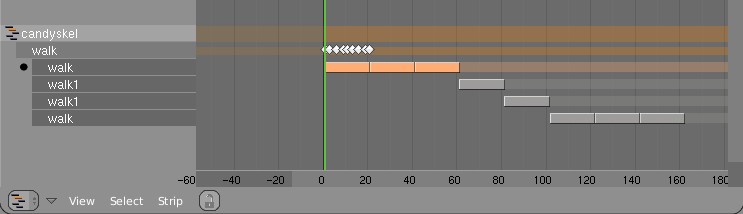
Here's an example edit image for NLA:
http://www.blender.org/bf/nla_match-cycle.jpg
And the animation for it:
http://download.blender.org/demo/test/2.43/0001_0150_match.avi
Blender file:
http://download.blender.org/demo/test/2.43/mancandy_matching.blend

Using this kind of cycling works pretty straightforward, and is a lot
easier to setup than Stride Bones.

To be further tested:
- Blending cycles
- matching rotation for the bones as well.

- ACTION MODIFIERS (motion deformors)

The above option was actually required for this feature. Typically walk
cycles are constructed with certain Bones to be the handles, controlling
for example the torso or feet.
An Action Modifier allows you to use a Curve Path to deform the motion of
these controlling bones. This uses the existing Curve Deformation option.
Modifiers can be added per Action Strip, each controlling a channel (bone)
by choice, and even allows to layer multiple modifiers on top of each other
(several paths deforming motion). This option is using the dependency graph,
so editing the Curve will give realtime changes in the Armature.

The previous walkcycle, controlled by two curves:
http://download.blender.org/demo/test/2.43/0001_0150_deform.avi
Blender file:
http://download.blender.org/demo/test/2.43/mancandy_actiondeform.blend

Action Modifiers can be added in the NLA Properties Panel. Per Modifier you
have to indicate the channel and a Curve Object. You can copy modifiers from
one strip to another using CTRL+C (only copies to active Object strips).

Setting up a correct Curve Path has to be carefully done:
- Use SHIFT+A "Curve Path" in top view, or ensure the path is not rotated.
- make sure the center point of the Curve Object is at the center of the
  Armature (or above)
- move the first point of the curve to the center point as well.
- check if the path starts from this first point, you can change it using
  (in Curve EditMode) the option Wkey -> "Switch Direction"
- Make sure alignment uses the correct axis; if the Armature walks into
  the negative Y direction, you have to set in Object Buttons, "Anim settings"
  Panel, the correct Track option. (Note; option will probably move to the
  Modifier later).

This is a good reason to make such paths automatic (on a command). Is on the
todo list.

Also note this:
- the Curve Path extends in beginning and ending, that's (for now) the default,
  and allows to use multiple paths. Make sure paths begin and end horizontal.
- Moving the Curve in Object Mode will change the "mapping" (as if the landscape
  a character walks over moves). Moving the Curve in Edit Mode will change the
  actual position of the deformation.
- Speed (Ipos) on paths is not supported yet, will be done.
- The Curve "Stretch" deform option doesn't work.
- Modifiers are executed *after* all actions in NLA are evaluated, there's no
  support yet for blending multiple strips with Modifiers.
- This doesn't work yet for time-mapping...

This commit is mostly for review by character animators... some details or
working methods might change.
This feature can also be used for other modifiers, such as noise (Perlin) or
the mythical "Oomph" (frequency control) and of course Python.

Special thanks to Bassam & Matt for research & design help. Have fun!
Object Layer Ipos didn't work when the Ipo was moved an Object Action.
Can't get this to work though... this option has been added with a lot
of exception handling already, and for action/nla it's very nasty to
blend/mix/add layer bit values. So; better not support that.

As feedback for users, I've added a notice popup when you try to move
layer-ipos to an action.
This commit brings back:

- Field Render
- MBlur Render (old style)
- Border render with or without cropping

Note: Field Render is not supported in Compositor yet. Blurring or filter
will destroy field information.
Both MotionBlur as Field render are done before Compositing happens.

Fixes:

- The "Save Buffers" option only worked on single frame renders, not for
  Anim render.
- Found an un-initalized variable in Render initialize... this might have
  caused the unknown random crashes with render.

Code restructure:

Cleaned up names and calls throughout the pipeline, more clearly telling
what goes on in functions.
This is visible in the updated first image of the Wiki doc:
http://mediawiki.blender.org/index.php/BlenderDev/RenderPipeline
Added simplified fix as proposed by Stephan Kassemeyer to allow scaled
Armatures to still have a working 'stride bone'. Only works for uniform
scaled armatures though.

In general, for properly working armatures, I'd recommend to never scale
it at all, and certainly not non-uniform scaling. It will give issues with
constraints, IK and drivers all over...
Using stride-bone in an NLA, on a path without speed Ipo, didn't correct
the case when an action starts on a non-zero value.
Patch provided by Roland Hess. Thanks!
A full detailed description of this will be done later... is several days
of work. Here's a summary:

Render:
- Full cleanup of render code, removing *all* globals and bad level calls
  all over blender. Render module is now not called abusive anymore
- API-fied calls to rendering
- Full recode of internal render pipeline. Is now rendering tiles by
  default, prepared for much smarter 'bucket' render later.
- Each thread now can render a full part
- Renders were tested with 4 threads, goes fine, apart from some lookup
  tables in softshadow and AO still
- Rendering is prepared to do multiple layers and passes
- No single 32 bits trick in render code anymore, all 100% floats now.

Writing images/movies
- moved writing images to blender kernel (bye bye 'schrijfplaatje'!)
- made a new Movie handle system, also in kernel. This will enable much
  easier use of movies in Blender

PreviewRender:
- Using new render API, previewrender (in buttons) now uses regular render
  code to generate images.
- new datafile 'preview.blend.c' has the preview scenes in it
- previews get rendered in exact displayed size (1 pixel = 1 pixel)

3D Preview render
- new; press Pkey in 3d window, for a panel that continuously renders
  (pkey is for games, i know... but we dont do that in orange now!)
- this render works nearly identical to buttons-preview render, so it stops
  rendering on any event (mouse, keyboard, etc)
- on moving/scaling the panel, the render code doesn't recreate all geometry
- same for shifting/panning view
- all other operations (now) regenerate the full render database still.
- this is WIP... but big fun, especially for simple scenes!

Compositor
- Using same node system as now in use for shaders, you can composit images
- works pretty straightforward... needs much more options/tools and integration
  with rendering still
- is not threaded yet, nor is so smart to only recalculate changes... will be
  done soon!
- the "Render Result" node will get all layers/passes as output sockets
- The "Output" node renders to a builtin image, which you can view in the Image
  window. (yes, output nodes to render-result, and to files, is on the list!)

The Bad News
- "Unified Render" is removed. It might come back in some stage, but this
  system should be built from scratch. I can't really understand this code...
  I expect it is not much needed, especially with advanced layer/passes
  control
- Panorama render, Field render, Motion blur, is not coded yet... (I had to
  recode every single feature in render, so...!)
- Lens Flare is also not back... needs total revision, might become composit
  effect though (using zbuffer for visibility)
- Part render is gone! (well, thats obvious, its default now).
- The render window is only restored with limited functionality... I am going
  to check first the option to render to a Image window, so Blender can become
  a true single-window application. :)
  For example, the 'Spare render buffer' (jkey) doesnt work.
- Render with border, now default creates a smaller image
- No zbuffers are written yet... on the todo!
- Scons files and MSVC will need work to get compiling again

OK... thats what I can quickly recall. Now go compiling!
Enabled Striding in NLA to also use FollowPath Constraint. Until now it
only worked when Object was parented to a Curve.
Interesting feature now is that it checks for all FollowPath Constraints,
and it chooses to stride over the first Path found with influence > 0.5.

Note: to make swithing to other paths work, map the time curve for these
paths to match the switch. This is not very NLA friendly... but let the
dudes in studio test it first. :)

Todo for later once; ensure proper blending...
the current frame was outside of strips. This gives potential errors with
playback that skips frames, or for a renderfarm. And, while editing the
poses got 'stuck' if you changed to different frames.

Now if no strips are found on 'current frame', always the first strip to
right is used, or the last strip to the left.
For some ancient reason, the stride option only worked on a single strip,
and extended always. This made it nearly impossible to integrate it well
with other actions in NLA.
This commit changes it as follows;

- As any strip, the striding-strip also stops at the end of a strip
- This allows to put multiple different actions on a single path, and if
  all of these have the striding option set, the actions will each do their
  own individual stride.
- To match the different actions, a new "Action Offset" button was added
  in the NLA Panel, which allows to internally cycle the action.
- Of course, blend-in and blend-out works nicely too.

Here's a quick AVI test with 2 actions. There's some slipping of the feet
between actions still, because of the stridebone blending. I might look
at that later, for now you can correct it with a simple Ipo on Armature too

http://www.blender.org/bf/0007_0151.avi
Strips with a repeat fraction (like 3.51) should also "hold" on the
fraction of .51 when indicated so.
Patch provided by Roland Hess, but cleaned up (exisiting) mess a bit too.
-> Any Group Duplicate now can get local timing and local NLA override. This
   enables to control the entire animation system of the Group.

Two methods for this have been implemented.
1) The quick way: just give the duplicator a "Startframe" offset.
2) Advanced: in the NLA Editor you can add ActionStrips to the duplicator
   to override NLA/action of any Grouped Object.

For "Group NLA" to work, an ActionStrip needs to know which Object in a
group it controls. On adding a strip, the code checks if an Action was
already used by an Object in the Group, and assigns it automatic to that
Object.
You can also set this in the Nkey "Properties" panel for the strip.

Change in NLA: the SHIFT+A "Add strip" command now always adds strips to
the active Object. (It used to check where mouse was). This allows to add
NLA strips to Objects that didn't have actions/nla yet.

Important note: In Blender, duplicates are fully procedural and generated
on the fly for each redraw. This means that redraw speed equals to stepping
through frames, when using animated Duplicated Groups.

-> Recoded entire duplicator system

The old method was antique and clumsy, using globals and full temporal
copies of Object. The new system is nicer in control, faster, and since it
doesn't use temporal object copies anymore, it works better with Derived
Mesh and DisplayList and rendering.

By centralizing the code for duplicating, more options can be easier added.
Features to note:

- Duplicates now draw selected/unselected based on its Duplicator setting.
- Same goes for the drawtype (wire, solid, selection outline, etc)
- Duplicated Groups can be normally selected too

Bonus goodie: SHIFT+A (Toolbox) now has entry "Add group" too, with a
listing of all groups, allowing to add Group instances immediate.

-> Library System

- SHIFT+F4 data browse now shows the entire path for linked data
- Outliner draws Library Icons to denote linked data
- Outliner operation added: "Make Local" for library data.
- Outliner now also draws Groups in regular view, allowing to unlink too.

-> Fixes

- depsgraph missed signal update for bone-parented Objects
- on reading file, the entire database was tagged to "recalc" fully,
  causing unnecessary slowdown on reading.

Might have missed stuff... :)
set whilst the actual time was 1 frame after the strip. Appeared to be
a rounding error that didnt show in OSX.

Previously I added a threshold, to make sure strips are included when the
current frame is exactly on the end. That threshold now is smaller, and
I also made the fmod() to be done only on repeating strips.
This fixes an error in the striding system, which was by default correcting
path position backwards in time, which could give errors when a stride bone
moves in the beginning of a path faster than the path moves. (Can you
follow that? cool!)

The patch checks for this case, it corrects by default forwards in time,
unless we're at the end of a path. As bonus this fix will also ensure the
character stays on the path closer.
Previously, using the "Stride Bone" tried to get that Bone motionless on
the path by correcting the internal time of the Action. This however caused
too many problems, especially with irregular walks.

The new system also tries to keep the Stride Bone motionless, but this by
moving the entire armature, and not changing the timing of the Action.
Give much nicer results. :)

To make editing Strides easier, I've added a new option in the NLA
panel to disable the path. This way you can quickly switch to editing the
action itself (keying the stride bone) and viewing the result.
1) Stride Bone

For walkcycles, you could already set an NLA strip to cycle over a path
based on a preset distance value. This cycling happens based on a linear
interpolation, with constant speed.
Not all cycles have a constant speed however, like hopping or jumping.
To ensure a perfect slipping-less foot contact, you now can set a Bone
in an Armature to define the stride. This "Stride Bone" then becomes a
sort-of ruler, a conveyor belt, on which the character walks. When using
the NLA "Use Path" option, it then tries to keep the Stride Bone entirely
motionless on the path, by cancelling out its motion (for the entire
Armature). This means that the animation keys for a Stride Bone have to be
exactly negative of the desired path. Only, at choice, the X,Y or Z Ipo
curve is used for this stride.

Examples:

http://www.blender.org/bf/0001_0040.avi
The top armature shows the actual Action, the bottom armature has been
parented to a Path, using the Stride Bone feature.

http://www.blender.org/bf/0001_0080.avi
Here the Stride Bone has a number of children, creating a ruler to be
used as reference while animating.

Test .blend:
http://www.blender.org/bf/motionblender1.blend

Notes:
- Note that action keys for Bones work local, based on the Bone's
  orientation as set in EditMode. Therefore, an Y translation always
  goes in the Bone's direction.
- To be able to get a "solvable" stride, the animation curve has
  to be inverse evaluated, using a Newton Raphson root solver. That
  means you can only create stride curves that keep moving forward, and
  cannot return halfway.
- Set the Stride Bone in the Editing Buttons, Bone Panel. You can set
  change the name or set the axis in the NLA Window, Strip Properties Panel.
- Files in this commit will move to the blender.org release section.

2) Armature Ghosting

In EditButtons, Armature Panel, you can set an armature to draw ghosts.
The number value denotes the amount of frames that have to be drawn extra
(for the active action!) around the current frame.
Ghosts only evaluate its own Pose, executing it's Actions, Constraints and
IK. No external dependencies are re-evaluated for it.

3) NLA/Action time control

If you click in the NLA window on the action (linked to Object), it makes
sure the Timing as drawn in the Action editor is not corrected for NLA.
If you also set the Object to "Action", this timing will be executed on the
Object as well (not NLA time).
(It's a bit confusing... will make a good doc & maybe review UI!)
1) Target-less IK

If you add an IK constraint without a target set (no object or bone target),
it now can be grabbed and moved with IK, using its own Bone tip or root as
target itself. This way you can use IK for posing, without having the IK
executed while it animates or while a Pose is being solved for real IK.

After grabbing "Target-less IK", it applies the resulted motion in the
pose-channels, which then can be used to insert keypositions.

The Target-less IK bone can still be rotated without IK, also its chain
can be edited as usual.

UI: The CTRL+I menu gives this as an option too. In the 3D window it is
drawn with orangish color.

Note that IK is not resistant to non-uniform scaling yet.

2) Auto-IK

When the option "Automatic IK" is set, in Edit Buttons Armature Panel,
it creates automatic temporal Target-less IK for the Bone you grab or
translate.

The rules are:

- it only works when a single Bone is selected
- if the Bone is a root bone (no parent), it adds IK to the end of the
  chain(s)
- otherwise it adds the IK to the active Bone
- the temporal IK chain only consists of connected Bones.

This method is still a bit experimental. Maybe it should become a special
grabbing option (like SHIFT+G in Pose Mode). It also only works OK for rigs
that fit for it well... when a rig already is fully setup with IK it can't
do much good. :)
- Action Editor: hotkeys V and H for handles were invisible, added menus
- NLA strips: when current frame is exactly on the strip end, it didn't
  include that action... needs a rounding correction for it.
- Action/NLA: deleting keys in Action, which results in only 1 key left,
  resulted in zero sized strip length. Now the strips are defaulted to be
  1 frame in size minimal.
- NLA editor: ALT+C "Convert to strip" didn't increment Action user count
- 3D Window: CTRL+P make parent to Bone still gave the insane menu with all
  bone names. With unified PoseMode select it can just parent to the
  active Bone. Note; this now requires the Armature to be in PoseMode to
  work.
- Rotation Constraint; the new options to only map to X,Y,Z rotation, did
  set the not mapped rotation axes to zero. These should remain unchanged.
- AutoKey optionn for Actions; should not insert action keys on ESC

And added a fix myself:

- When SHIFT+selecting a Bone in PoseMode, and the Armature was not selected
  or active yet, it doesn't extend-select/deselect the Bone anymore.
  This case is only useful when you try to add IK or Constraint, so the
  shift+selection should only activate the clicked Bone.
It works like for moving Object Ipos to the Action, press the Action icon
in the header of the IpoWindow, to the left of the mode selection menu.
It then creates an Action (if not existed) and moves the Shape Ipo to the
Action, using custom channel "Shape".

Main code change was that evaluating Ipo Curves for Relative Shapes had to
be recoded, but that's pretty minor and even much cleaner. (added "curval"
in the KeyBlock struct).
That this feature can work is thanks to the full modifier/derivedmesh
recode Daniel did, can't give him enough credits! :)

Also; small fixes in Outliner, for clicking on the Ipo icon (sets the Ipo
window to show that Ipo).
In PoseMode, press Wkey or use the Pose pulldown menu. It calculates the
positions of all selected Bone end points, over the time as indicated with
the Scene start/end frame. This then is drawn as a path, with little black
dots on every frame, and a white dot on every 10 frames.

Paths are not saved in files, and not calculated automatic yet on changes.

To make this relative fast, but also reliable, I had to add a new method
in the Dependency graph system, to find exactly (and only) these parents
of an Object that influence its position. This is needed because the path
should show the actual global coordinates of the entire animation system.
- Added (BKE_utildefines.h) POINTER_TO_INT(poin) and INT_TO_POINTER(int)
  defines, to help fixing issues with switch to 64 bits systems. This
  assumes that a) not more than 16GB mem is used and b) that address
  space is below the 1<<35 value. The latter has to be confirmed, but it
  seems to conform the current 64 bits generation of OSs (for mallocs).

  Needless to say; use long if you want to store pointers! This is for
  temporal fixing.

- Added editmesh version for mesh-octree lookups, not used yet.

- Fix: ESC on armature posemode restored the actions, should not happen

- Fix: If in NLA an action was 0 frame long, it caused draw error

- Fix: Click on name in Action Window now activates Bones

- Fix: "Snap to" options in Armature editmode now use X-axis mirror edit.
rendered with MBlur or Fields.
This is a fix for now, but I've already noticed several pending issues for
Blender's internal time control (time ipos, global time control, startframe
offsets, etc). That's for another time! (pun not intended :)
module -- the previous method could be off pretty far.
- Added drawing of transparent surface for it, instead of just the border.
- Added "stretch IK", allowing bones not only to rotate, but also scale.
  The "Stretch" value below the DoF buttons is used to enabled this.

- Some code tweaking: slightly simplified computation of transform for IK,
  renamed chain to tree, removed unused pchan->ik_mat, ..

Internal IK module work:
- Do damping per DoF also based on stiffness, hopefully makes it converge
  faster with very stiff joints.
- Instead of having two joints types (translational and rotational), now
  all 6 DoF's can be enabled for one joint.
- Added limits for translational joints.
Best is to forget yesterday's commit and old docs. New docs are underway...

Here's how IK works now;

- IK chains can go all the way to the furthest parent Bone. Disregarding
  the old option "IK to Parent" and disgregarding whether a Bone has an
  offset to its parent (offsets now work for IK, so you can also make
  T-bones).
- The old "IK to Parent" option now only does what it should do: it denotes
  whether a Bone is directly connected to a Parent Bone, or not.
  In the UI and in code this option is now called "Connected".
- You can also define yourself which Bone will become the "Root" for an IK
  chain. This can be any Parent of the IK tip (where the IK constraint is).
  By default it goes all the way, unless you set a value for the new IK
  Constraint Panel option "Chain Lenght".
- "Tree IK" now is detected automatic, when multiple IK Roots are on the
  same Bone, and when there's a branched structure.
  Multiple IK's on a single chain (no branches) is still executed as usual,
  doing the IK's sequentially.
- Note: Branched structures, with _partial_ overlapping IK chains, that don't
  share the same Root will possibly disconnect branches.
- When you select a Bone with IK, it now draws a yellow dashed line to its
  Root.
- The IK options "Location Weight" and "Rotation Weight" are relative,
  in case there's a Tree IK structure. These weights cannot be set to
  zero. To animate or disable IK Targets, use the "Influence" slider.
- This new IK is backwards and upwards compatible for Blender files.
  Of course, the new features won't show in older Blender binaries! :)

Other changes & notes;

- In PoseMode, the Constraint Panel now also draws in Editing Buttons, next
  to the Bones Panel.
- IK Constraint Panel was redesigned... it's still a bit squished
- Buttons "No X DoF" is now called "Lock X". This to follow convention to
  name options positive.
- Added Undo push for Make/Clear Parent in Editmode Armature
- Use CTRL+P "Make Parent" on a single selected Bone to make it become
  connected (ALT+P had already "Disconnect").

On todo next; Visualizing & review of Bone DoF limits and stiffness
Full logs for changes will be added later. Worth to note now;
- support for 'tree IK' added
- DOF and stiffness per IK bone (in pose only)
- Orientation IK support (target rotates -> chain follows)

This is still WIP. Buttons might change, button ranges will change, and the
way 'IK groups' are working will change. You can play with this, but don't
expect saved files to work still by end of this day! :)
Main target was cleanup of editconstraint.c and removal of the ugly
ob->activecon (active constraint channel), which was set by the "Show"
button in the Constraint Panel.
Better is to introduce an 'Active Constraint' itself, which stores in
the Constraint itself. By using this setting, and by checking the active
Bone, the UI can update reliably now. This only shows now in IpoWindow
btw (for constraint ipos). The active Constraint is drawn in the Buttons
with a slightly brighter backdrop. Any action in that Panel selects a
constraint now (even click in backdrop).

So now we have pose channels & constraint channels nicely behaving. Now the
darn Action channels... :)

Further in this commit:

- interface.c: Button ROUNDBOX now does button callback too.
               Button NUMSLI didn't do the callback on a click only

- Cleaned up include files in yafray, got annoyed it compiled over all the
  time.

- removed unused variables from Constraint struct
- removed {lattice,curve}_modifier functions
 - changed render code to use displist for curve rendering
   instead of making its own. required adding a bevelSplitFlag
   field to DispList. I also fixed the bevel face splitting
   which did not work correctly in many situations.
 - changed so all curve data creation happens in makeDispListCurveTypes,
   includes making bevel list and filling polys
 - changed render code to use displist for surface rendering
 - removed Curve.orco variable, built as needed now
 - removed stupid BLI_setScanFill* functions... why use a function
   argument when you can use a global and two functions! Why indeed.
   (this fixed crash when reloading a file with filled curves and
   toggling editmode)
 - bug fix, setting curve width!=1 disabled simple bevel for no
   apparent reason
 - cleaned up lots and lots of curve/displist code (fun example:
   "if(dl->type==DL_INDEX3 || dl->type==DL_INDEX3)"). Hmmm!
 - switched almost all lattice calls to go through lattice_deform_verts,
   only exception left is particles
 - added DBG_show_shared_render_faces function in render, just
   helps to visualize which verts are shared while testing (no
   user interface).
 - renamed some curve bevel buttons and rewrote tooltips to be
   more obvious
 - made CU_FAST work without dupfontbase hack

Also by the way I wrote down some notes on how curve code
works, nothing spiffy but it is at:

http://wiki.blender.org/bin/view.pl/Blenderdev/CurveNotes
He even made a nice doc in wiki:
http://wiki.blender.org/bin/view.pl/Blenderdev/Blendgz

Usage: set the option "Compress File" in the main "File" pulldown menu.
This setting is a user-def, meaning it is not changed on reading files.
If you want it default, save it with CTRL+U.

The longest debate went over the file naming convention. Shaul started
with .blend.gz files, which gave issues in Blender because of the code
hanging out everywhere that detects blender files, and that appends the
.blend extension if needed.

Daniel Dunbar proposed to just save it as .blend, and not bother users
with such details. This is indeed the most elegant solution, with as
only drawback that old Blender executables cannot read it.
This drawback isn't very relevant at the moment, since we're heading
towards a release that isn't upward compatible anyway... the recode
going on on Meshes, Modfiers, Armatures, Poses, Actions, NLA already
have upward compatibility issues.
We might check - during the next month(s) - on a builtin system to
warn users in the future when we change things that make a file risky
to read in an older release.