Apparently being so scroogish for cpu cycles makes crashes in Linux. I'll
add it on todo for later checks, but I need a windows or linux coder for
it!

For users: it might fix crashes when you have NodeTrees in Libraries.
The "Copy Size" constraint was calling a where_is_object(), this caused
the depsgraph to mess up in very weird ways and rare occasions. In the
sample file it showed strange lags in bones for using the "Stride bone"
option.

While trying to locate the bug I've revisited the Pose depsgraph in detail,
trying to figure out how it can print possible cycle errors in dependency.
That has been added now too (in console). Unfortunately the bugreport
example had no cycle errors. :)
Clear transform (ALT+G/R/S) in Pose sometimes didnt work, for example when
armature is being controlled by other armature. Caused by double depsgraph
flushing.
- FORWARD CYCLING & MATCHING

Up to no now, adding multiple actions in NLA with walkcycles required to
animate them standing still, as if walking on a conveyor belt. The stride
option then makes the object itself move forward, trying to keep the foot
stuck on the floor (with poor results!).
This option now allows to make walk cycles moving forward. By
indicating a reference Offset Bone, the NLA system will use that bone to
detect the correct offset for the Armature Pose to make it seamlessly going
forward.

Best of all, this option works as for cyclic Action Strips as well as for
individual Action Strips. Note that for individual strips, you have to set
the strip on "Hold". (Might become automatic detected later).

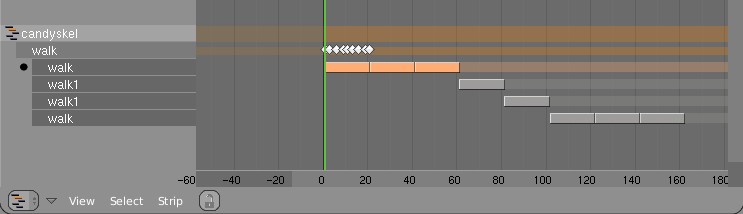
Here's an example edit image for NLA:
http://www.blender.org/bf/nla_match-cycle.jpg
And the animation for it:
http://download.blender.org/demo/test/2.43/0001_0150_match.avi
Blender file:
http://download.blender.org/demo/test/2.43/mancandy_matching.blend

Using this kind of cycling works pretty straightforward, and is a lot
easier to setup than Stride Bones.

To be further tested:
- Blending cycles
- matching rotation for the bones as well.

- ACTION MODIFIERS (motion deformors)

The above option was actually required for this feature. Typically walk
cycles are constructed with certain Bones to be the handles, controlling
for example the torso or feet.
An Action Modifier allows you to use a Curve Path to deform the motion of
these controlling bones. This uses the existing Curve Deformation option.
Modifiers can be added per Action Strip, each controlling a channel (bone)
by choice, and even allows to layer multiple modifiers on top of each other
(several paths deforming motion). This option is using the dependency graph,
so editing the Curve will give realtime changes in the Armature.

The previous walkcycle, controlled by two curves:
http://download.blender.org/demo/test/2.43/0001_0150_deform.avi
Blender file:
http://download.blender.org/demo/test/2.43/mancandy_actiondeform.blend

Action Modifiers can be added in the NLA Properties Panel. Per Modifier you
have to indicate the channel and a Curve Object. You can copy modifiers from
one strip to another using CTRL+C (only copies to active Object strips).

Setting up a correct Curve Path has to be carefully done:
- Use SHIFT+A "Curve Path" in top view, or ensure the path is not rotated.
- make sure the center point of the Curve Object is at the center of the
  Armature (or above)
- move the first point of the curve to the center point as well.
- check if the path starts from this first point, you can change it using
  (in Curve EditMode) the option Wkey -> "Switch Direction"
- Make sure alignment uses the correct axis; if the Armature walks into
  the negative Y direction, you have to set in Object Buttons, "Anim settings"
  Panel, the correct Track option. (Note; option will probably move to the
  Modifier later).

This is a good reason to make such paths automatic (on a command). Is on the
todo list.

Also note this:
- the Curve Path extends in beginning and ending, that's (for now) the default,
  and allows to use multiple paths. Make sure paths begin and end horizontal.
- Moving the Curve in Object Mode will change the "mapping" (as if the landscape
  a character walks over moves). Moving the Curve in Edit Mode will change the
  actual position of the deformation.
- Speed (Ipos) on paths is not supported yet, will be done.
- The Curve "Stretch" deform option doesn't work.
- Modifiers are executed *after* all actions in NLA are evaluated, there's no
  support yet for blending multiple strips with Modifiers.
- This doesn't work yet for time-mapping...

This commit is mostly for review by character animators... some details or
working methods might change.
This feature can also be used for other modifiers, such as noise (Perlin) or
the mythical "Oomph" (frequency control) and of course Python.

Special thanks to Bassam & Matt for research & design help. Have fun!
settings, rather than using the object's TrackX/Y/Z/etc buttons.

 This is good for two reasons: a) having the settings over in the object buttons
 before was terribly unintuitive and hidden, now it's more visible how to
 control the deformation, and b) now if you have more than one curve modifier,
 they can have their own settings, instead of being forced to use the object
 level data.
Especially for Compositing it was annoying that colors always got clipped
in the 0.0-1.0 range. For this reason, extrapolated Curves now is the
default. Old saved files still have horizontal extrapolation.

Set the option with 'Tools' menu (wrench icon). This is a setting per
curve, so you might need to set all 4 curves for an RGBA curves widget.
input nodes was 'passing on' the buffer (because it didn't operate on the
image). That's for example for Blur with size 0 or for Translate node.
This passed-on buffer then got freed inside the group...

Solution now is just a malloc. Better system should be devised, with
reference counting or so. Thanks Ivan Hoffmann for the sample file!
- Icon previews for Images were created always for old files, which made
  browsing (menus) incredible slow. Added a minor change in the flow, so
  icons only get created when the user invokes loading images.
  Andrea; you might check this, probably not al cases are covered yet?

- Compositor: the 'File Output' node now has a min/max frame for which it
  writes files

- Compositor: fixed a very bad bug (even in 2.42a release) that made the
  depsgraph for nodes not work... while editing, only the nodes that change
  should be recalculated, but accidentally all of them were done each time.
SB collision targets may be picked up from modifier stack
works fine with static targets having subsurf and/or array mofifiers
see-->
http://www.wund.homepage.t-online.de/hidden/Mstack.blendhttp://www.wund.homepage.t-online.de/hidden/Mstack_II.blend
however when calulating the SB object dynamics the vertices of the
'deform only' m-stack result are used
so SB <-> SB may look strange
subsuf modifier is applied to SB object after doing SB dynamics
(that is: colliding mesh is subsurfed, SB is not )
subsurfed SB cubes colliding
link --> http://www.wund.homepage.t-online.de/hidden/ColSelfMod.blend
or may give unwanted results
subsuf and array modifier is applied to SB object after doing SB dynamics
link --> http://www.wund.homepage.t-online.de/hidden/ColSelfMod_nobug.blend
last, modifiers that change vertex locations in time (like waves)
suffer from not beeing seen at needed time resolution
(SBs see colliders static in a frame)
well but that's beyond the limits of the current dep-graph use
and needs to be resolved on design level
anyhoo have fun
BM
Duplicating a Library-linked Mesh with Library-linked texture Images forgot
to set the texture Image link flag to LIB_EXTERN (LIB_INDIRECT means the ID
is not saved in file).

Error was that a the duplicated Mesh lost texture.
http://www.blender3d.org/cms/Shadow_buffer__Halfway.786.0.html

Simply said: by using the average of the nearest and 2nd nearest Z value
in Shadowbuffers you can reduce bias errors very well.
For backwards compatibility it is a new buffer type though.
Full log:
http://www.blender3d.org/cms/Irregular_Shadow_Buffe.785.0.html

In short: this is a shadow buffer approach that always results in crispy
shadows, independent of lamp buffer size or zoom level. This shadow buffer
system also supports transparent shadow.

This is part of work on refreshing Shadow Buffers in Blender. You now can
choose of two types (Classical, Irregular). More types will follow. Also
quality issues for Classical shadow buffers are going to be reviewed,
especially to solve the lousy Biasing.

For the CVS log record; it is based on articles:
Gregory Johnson et al, University of Texas, Austin. (Regular grid method).
Timo Aila and Samuli Laine, Helsinki University of Technology. (BSP method).
nicer kinematics in self collision -> blending to complete inelastic impact
now does something close to real physics

first steps towards aerodynamics
anisotropic friction
springs 'see' their movement in media
--> see surrrounding  media does not move and/or reacts on wind
(*for now  needs to have a pseudo collider araound  -> that is: add a cube in the same layer
and make it a deflector  *)
* print (# servers) instead of icon row when there are servers in the list
* dark-green circle behind server icon in server list when connected
* orange when connecting
* added two files from verse-master
* server list is available in outliner (new mode "Verse Servers")
* verse sessions are now also in new mode "Verse Sessions" in outliner
* fixed drawing of verse sessions and their nodes
* in user preferences System & OpenGL master-server ip setting (default master.uni-verse.org)
* in File>Verse entry "Get Servers" to get server list or
* RMB on "Available Verse Servers" in outliner to "Refresh" server list

Enjoy :)
just did a few tests, with the 'surprising' result that balls are not curves ..
and i don't want to be swamped by bug reports tellling me
'it does not collide as i whised it would'
only alow self collision for suited objects

feature request from hairdressers
self collision for curves
works amazingly well if you keep in mind there balls around vertices colliding
ironing out a few glitches related to goal pinning
volatile test blend ->
http://www.wund.homepage.t-online.de/hidden/sb_col_must.blend
+ adding a few alternative collision ball calculation algos
since i did not want to blow up (waste)  DNA space without need,
coded as -1.0 -0.1 -1.1 values in 'ball size' (look at tooltip popup)
simple (naive) self collision
estimates a collision ball
using the spring lenght to attached neighbours
(idea stolen from old cloth modifier files, but i'm sure ZAZ and genscher won't mind)
-- usefull for untangeling static cloth like objects
-- may be used for cloth simulation with known limitations
like 'tunnel effect' if objects are moving too fast ...
demo -- volatile files
http://www.wund.homepage.t-online.de/hidden/sb_without_selfcol.avihttp://www.wund.homepage.t-online.de/hidden/sb_with_selfcoll.avi
have fun
BM
Gives local structure stability for though fabrics, thin steelplates ..
even suzanne gets pretty crash resistant that way.
If non zero it not only adds diagonals but all other "2edge-wide" springs
so it somehow replaces stiff quads for meshes too.
- A new Save image function, next to the existing Save As.
- Shortcut keys Alt+S, Alt+R, Alt+O and Alt+N for Save, Reload, Open
  and New image respectively, consistent with the text editor window.
- Hide Select and UVs menus when UV editing isn't active.
- Removed duplicate and unused code, also moved some functions.
previous one was ok as a quick fix during orange and showed distortion obviously
but it was kind of extreme, and I'd rather not be blamed for causing blindness
or brain tumours because of it. This pattern is nicer, and still shows
distortion and its location on the map well.
falloff and spacing. Click the button labeled "P" next to the sliders.
Works best for opacity, other options can give poor quality strokes in
some cases. Also performance needs to be improved.

Remember, works only on X11 and Mac, no Windows support for tablets yet.